
Track what’s really happening.
A private symptom journal for perimenopause and menopause. Record each episode, keep track of sleep and cycle changes, and bring a clearer history to your next appointment.
iOS 15+ · Android 8+
No account or advertising. Your symptoms, notes and health data are stored locally. Optional device backups and files you export are under your control. The app uses usage analytics and a subscription provider; see the privacy policy for details.
A journal that fits your life
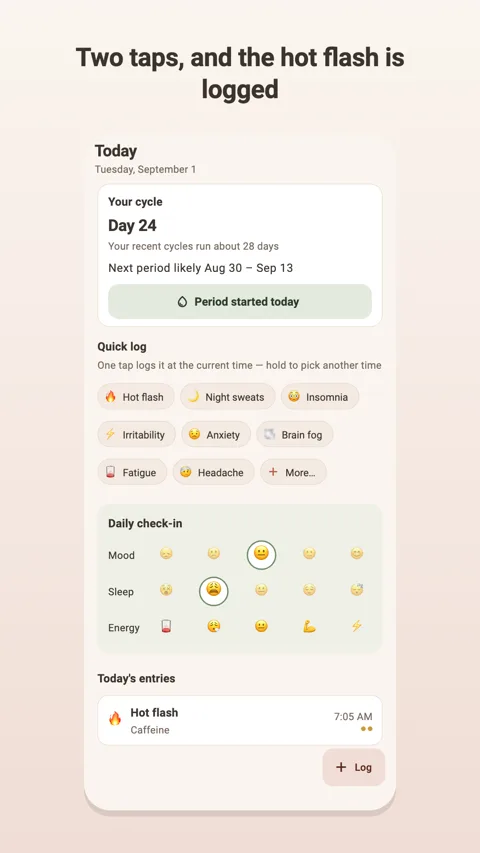
Record each episode
Log hot flashes and other symptoms with time, intensity, triggers and notes. Add your own symptoms and edit previous entries.
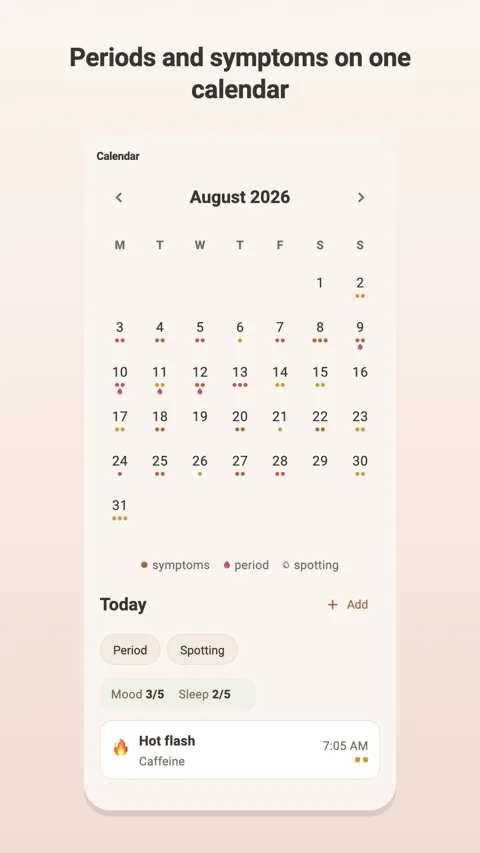
Keep a cycle history
Mark periods and spotting in the calendar. Setup adapts to your situation, including when you no longer have periods.
Track medication without pressure
Record HRT, other medication or supplements you choose. Menolyn does not promote a treatment.
Bring sleep into the picture
Enter sleep manually or optionally read it from Apple Health or Health Connect for your daily check-in.
Inside Menolyn
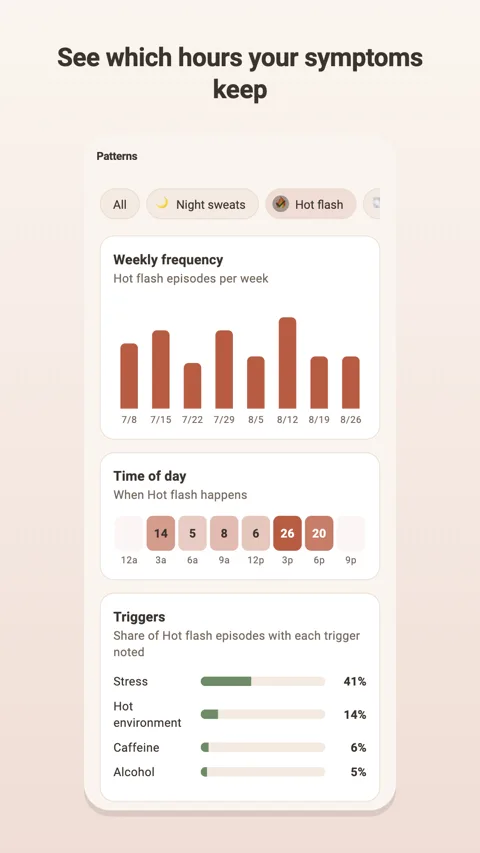
Real Android app screens. Available on iPhone and Android.
Free logging. Optional Menolyn Plus.
Symptom logging, daily check-ins, calendar, custom symptoms and CSV export are free. Plus adds pattern insights, the doctor-report PDF and medication reminders. US reference pricing: $5.99/month or $39.99/year; the annual plan offers a 7-day trial. Local prices and eligibility are shown in your store before purchase. Subscriptions renew automatically unless cancelled.
Practical help
How do I correct an episode?
Open the entry from Today or the calendar. Adjust its time, intensity, triggers or note, or delete it from the entry screen.
How do I move my journal to another phone?
Use Backup and restore in the More tab to save a backup file, then restore that file in Menolyn on the new device. Keep it somewhere safe: it contains your journal. CSV export is useful for reading your history, but is not a restore backup.
How do I prepare for a doctor’s appointment?
Review your journal and export a CSV from More. With Plus, open Doctor report and create a PDF to save, print or share. The PDF report is currently in English. It is a summary of your entries, not a medical assessment.
How do I cancel or restore Plus?
Manage cancellation in Apple’s or Google Play’s subscription settings. Cancellation stops the next renewal; your journal remains available. If a purchase is missing, open the Plus screen and select Restore purchases. Refund requests go through the store that processed the purchase.
Do I have to connect Apple Health or Health Connect?
No. Sleep access is optional and off by default. You can log manually and revoke access in your system health settings.
Which languages are supported?
English, German, French, Spanish, Italian, European and Brazilian Portuguese, Russian, Ukrainian, Turkish, Japanese and Simplified Chinese. Choose the app language at the top of Settings.
A journal, not a diagnosis
Menolyn is a wellness and tracking aid. It does not diagnose, treat or prevent medical conditions. Discuss your symptoms and treatment questions with a qualified healthcare professional.